
Receiving S.M.A.R.T. status bad backup and replace error
If your computer encounters the error, "S.M.A.R.T. Status BAD, Backup and Replace. Press F1 to resume," it's likely your hard drive has failed or is about to fail.
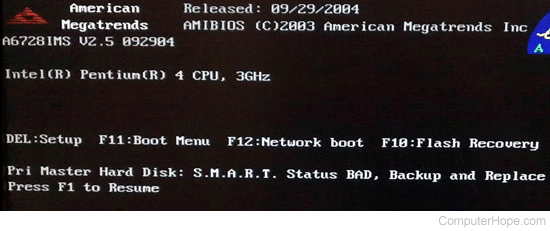
What is S.M.A.R.T.?
The S.M.A.R.T. system is a utility that monitors the "health" of the hard drive and reports any potential problems. As an early warning system, it allows the computer owner time to back up any important files before the hard drive fails. In the above example, the error message indicates that the Pri Master (primary master) hard drive is the drive that is bad. If there is more than one hard drive in the computer, this error may change depending on the bad drive.
What should I do if I encounter this error?
If the computer can boot after pressing F1 immediately backup all information on the computer and contact the hard drive manufacturer for replacement or additional help. In some very rare cases, the S.M.A.R.T. implementation on your computer may have issues of its own and may need to be patched before replacing the hard drive.
If you press F1 and the computer doesn't boot, one or more of the boot files that are required to boot may be corrupt. It may still be possible to recover some data on the hard drive. You need to boot from another disk like an UBCD (Ultimate Boot CD) or Linux LiveCD, created on another computer. Once you've booted to an alternate location, the files may still be accessible on the bad drive. If they are accessible, they can be moved to an alternative location, such as a USB (universal serial bus) jump drive.
If I get a S.M.A.R.T. error, should I continue to use my hard drive?
As stated above, S.M.A.R.T. is designed to detect upcoming failures in the hard drive. While the hard drive may not fail for several months, it's still inevitable it's going to fail. It is ok to continue to use the hard drive. However, we highly recommend if you are still under warranty you consider getting the drive replaced before your warranty runs out.
You may be able or enable or disable the S.M.A.R.T. detection in your CMOS setup.
1720 - smart hard drive detects imminent failure
This error message is related to S.M.A.R.T. and is an indication of failure. See above recommendations for additional details.