
How to spell check a document
Below are the different methods for spell-checking a document in many major word processing and text editor programs.
Spell check in Microsoft Word, Excel, and Outlook

All versions of Microsoft Word, Excel, and Outlook can spell check a document. To spell check a document, follow the steps below.
- Open Microsoft Word, Excel, or Outlook, and the document or file you want to edit.
- Press F7.
or
- Open Microsoft Word, Excel, or Outlook, and the document you want to edit.
- Click the Review tab in the Ribbon.
- In the Proofing group, click the Spelling or Spelling & Grammar option. If you don't see that option on the Review tab, click the Editor option in the Proofing group to access the spelling and grammar features.
Following the steps above starts a spell check on the document you're viewing. Each spelling error found gives options to change the word to one of the available suggestions. If the word is spelled correctly, click Ignore. If the word is misspelled and you believe that spelling error is made throughout your document, click Change All. Or, to change the word to an alternate spelling, select one of the suggestions from the suggestion list and click Change.
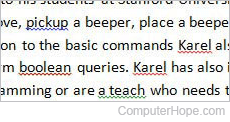
Microsoft products also automatically underline any misspelled word in a red squiggly underline, similar to what is shown in the picture. To correct these misspelled words, right-click the word and choose the correctly spelled word.
Microsoft Notepad and WordPad
Microsoft Notepad and Microsoft WordPad do not have any spell check solution. To spell check a document written in either program, use another program like Microsoft Word or an online solution.
Corel WordPerfect
All versions of Corel WordPerfect can spell check a document. To spell check a document, follow the steps below.
- Open Corel WordPerfect and the document you want to edit.
- Press Ctrl+F1 keyboard shortcut.
or
- Open Corel WordPerfect and the document you want to edit.
- Click Tools.
- Click Spell Checker.
OpenOffice Writer and Calc
You can spell check a document in OpenOffice Writer and Calc by following the steps below.
- Open OpenOffice Writer or Calc and the document you want to edit.
- Press F7.
or
- Open OpenOffice Writer or Calc and the document you want to edit.
- Click Tools.
- Click Spellcheck.
Spell check Google Docs
You can spell check a document in Google Docs by following the steps below.
- Open the Google Docs document you want to edit.
- Press Ctrl+Alt+X (Command+Alt+X on macOS).
or
- Open the Google Docs document you want to edit.
- Click Tools in the menu bar.
- In the drop-down menu, under Spelling and grammar, select Spelling and grammar check.
As in Microsoft Word, as you type in Google Docs, any word misspelled is wavy underlined in red. You can right-click any word with a red underline and choose the correct spelling.
Linux, BSD, or macOS terminal
To check spelling of a plain text file in the terminal of any Unix-like operating system (e.g., Linux, BSD (Berkeley Software Distribution), macOS, or WSL (Windows Subsystem for Linux)), use aspell.
For example, to check the spelling of the text file myfile.txt, you can run:
aspell -c myfile.txt
The aspell interface shows a portion of the file on top, with a highlighted word that might be misspelled. Underneath, you are given a set of suggested replacements.
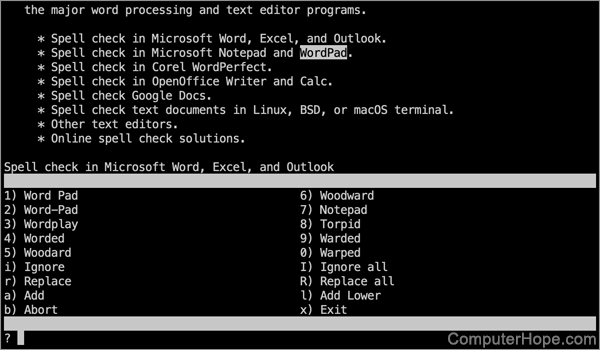
- To replace the highlighted word with one of the suggestions, press that number.
- To ignore that occurrence of the word, press i. To ignore all occurrences of that word, press I (uppercase i).
- To manually enter a replacement for this occurrence, press r. To enter a replacement for all occurrences, press R.
- To add the highlighted word to the aspell dictionary, so it's always accepted, press the a key. To add the word using lowercase letters (ignoring uppercase in this occurrence), press l (lowercase L).
- To abort the spellcheck, discarding any changes, press b, Y. To exit immediately without discarding changes, press x.
Installing aspell
The aspell program can be installed with your operating system's package manager. For example, on Debian, Ubuntu, or Linux Mint, you can install it with apt:
sudo apt install aspell
On FreeBSD, you can install aspell with pkg:
pkg install aspell
On macOS, if you're using Homebrew, you can install aspell with brew:
brew install aspell
For more information, see: Linux aspell command help and examples.
Other text editors
If the text editor you're using is not listed above, try searching the program's online documentation for a spell check solution. You can open the online help for almost any program by pressing F1. If searching the online help finds nothing relating to "spell check," the program may not offer that function. If this is the case, you may want to consider an alternate program.
Online solutions
Several online services are available to spell check your documents for you. Also, add-ons are available for your web browser that provide a spell checking function.