
Is this file infected with spyware, virus, or other malware?
If you believe more than one file is infected, see: How to remove a virus and malware from my computer.
Computer spyware, viruses, and other malware can infect a computer many different ways. However, most infections are done through executable files or scripts. If you are concerned about a specific file being infected with a computer virus, follow the steps below to check the file.
Scan individual files with the installed antivirus scan
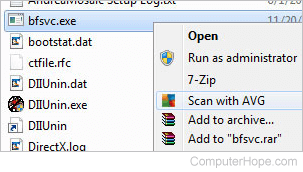
When an antivirus program is installed, it can scan all files on the computer, and each file individually. Each file can be scanned by right-clicking the file and choosing the option to scan the file for viruses. For example, in the picture below, we've highlighted the bfsvc.exe file and right-clicked the file to see the Scan with AVG option in the file menu. When this option is selected, the AVG antivirus program opens and scans that file for any viruses.
Online virus scan
Alternatively, you can check the file using VirusTotal, an excellent service that takes any file and scans it with several of the top antivirus programs to check for viruses.