
Disk Cleanup
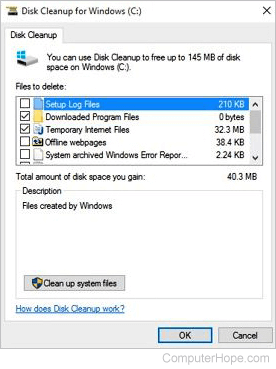
Disk Cleanup is a Microsoft software accessory introduced with Windows 98 and included in all subsequent releases of Windows. It allows users to remove files that are no longer needed or that can be safely deleted. Removing unnecessary files, including temporary files, helps speed up and improve the performance of the hard drive and computer. Running Disk Cleanup at least once a month is an excellent maintenance task and frequency.
As the image shows, Disk Cleanup can delete temporary Internet files (associated with Internet Explorer), downloaded program files, and offline webpages. Disk Cleanup also lets you empty the Recycle Bin, delete temporary files, and delete thumbnails.
How to open Microsoft Disk Cleanup
Microsoft Disk Cleanup can be opened by following these steps.
Windows 11, Windows 10, and Windows 8
- Press Windows key+X to open the Power User Task Menu.
- In the menu, tap or click the Run option.
- In the Run text field, type cleanmgr and press Enter.
Windows 7 and earlier
- Open the Start menu.
- Click Programs > Accessories > System Tools.
- In System Tools, click the Disk Cleanup utility.
or
- Open the Start menu.
- Click the Run option.
- In the Run text field, type cleanmgr and press Enter.
What to do in Disk Cleanup
Once Disk Cleanup opens, the initial window asks you which drive you want to clean up. Select the appropriate drive and click OK. In the next window that opens, check each of the boxes you want to clean up. To the right of each item is the disk drive space each of the items are taking up on the hard drive.
We highly recommend users DO NOT check the option to Compress old files (if seen). Often this option causes more issues than the small amount of space it recovers is worth.
Once each of the boxes is checked, click OK to start the cleanup process.
BleachBit, Operating system terms, Registry cleaner, Utility, Windows Accessories