
Laptop buying tips
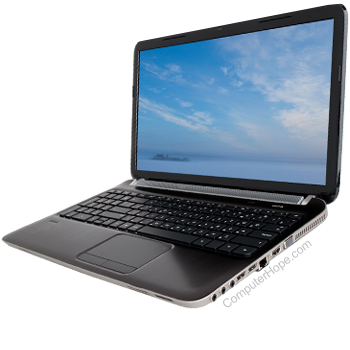
Purchasing a home or business laptop can be a confusing and sometimes frightening experience. Below is a listing of help and tips when considering purchasing a laptop computer.
What to look for
When purchasing a laptop, you likely have a general idea of what you want or how you want to use it. Below is a list of the various components found in most laptops today and recommendations and tips when considering any of these components.
Battery usage
Determine how long the battery is expected to last under regular use. Many manufacturers indicate a battery usage time, but this may be at the lowest possible settings; ensure the manufacturer clarifies what the normal battery usage life is when using the portable computer in all power modes.
Display
While most laptops include a VGA, HDMI, or DisplayPort for connecting an external monitor, the laptop's display is an important consideration. When looking at the display, ensure it is large enough for your needs. If the price is not the most important consideration for you, we highly recommend purchasing a laptop with at least a 15" or 17" display size. If the price is a concern, we suggest looking for a laptop with a 13" or smaller display size.
Complete buying tip information on Flat-Panel or LCD solutions can be found on our flat-panel buying tips page.
Drives
Drives are sometimes overlooked when considering a portable computer but can be an important consideration. Portable computers can come with various drive configurations, for example:
- One drive bay with a DVD-ROM or DVD writer drive. If you do not plan to write data to a DVD, the basic DVD-ROM drive is adequate. However, if you want to save data to a DVD, make sure the laptop includes a DVD writer, often listed as a DVD-RW drive.
- No drive bay allows a laptop to be light and utilize external drives instead of internal drives. Pay close attention to the price of these laptops. While it may appear to be a portable solution, many manufacturers charge you an additional price for the external drives, which are often needed.
You may also want to consider different media solutions. For example, all laptops include one or more USB ports for USB flash drives or external hard drives. Having a laptop with at least two USB ports is beneficial, allowing you to connect a wireless mouse and USB flash drive or external hard drive at the same time.
Hard drive
Hard drives have and always will be an important consideration when purchasing a new portable computer. Like a standard computer, the hard drive is the destination of all your files and information, and if that drive becomes full, that drive must be replaced, or an external drive needs to be connected to the laptop. When looking at the hard drive space, look for a laptop with the maximum hard drive size to give you more storage space long term.
Complete buying tip information on hard drives is on our hard drive buying tips page.
Lock
Does the laptop include any locking system? If yes, what locking system is included? This can be important if you are on the road or frequently use the laptop in public places.
Memory
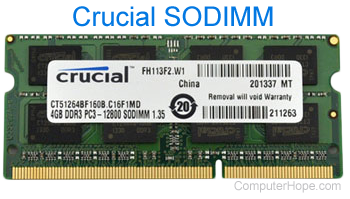
Memory is and will be an important consideration when looking at purchasing a laptop. Determine the amount of memory included in the laptop, and verify if there are one or more empty memory slots for adding more memory in the future. The more memory the laptop has or can support, the faster and more efficient the laptop can perform for many use cases.
Complete buying tip information on computer memory is on our memory buying tips page.
Modem
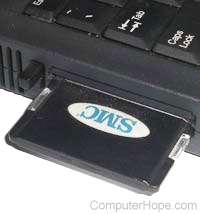
While less commonly used today, if a modem is required for Internet connectivity, ensure the laptop has a PC Card slot. Current laptops rarely include a modem, so you need to purchase a PCMCIA modem and connect it to the laptop using the PC Card slot.
Complete buying tips and information on modems are on our modem buying tips page.
Network Card
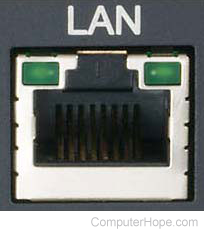
If a network connection is required, ensure a network port is available on the laptop. Today, nearly all laptops have a network port built-in and available to use for Internet connectivity.
Complete buying tips and information on network cards are on our network card buying tips page.
Processor
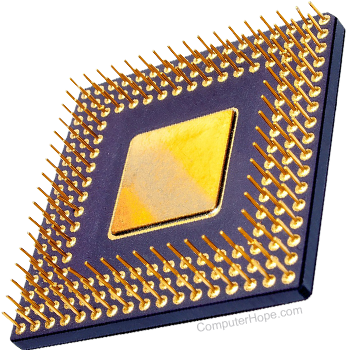
The computer processor is always an important consideration when purchasing a laptop. Today, with multiple processor manufacturers, it may be more confusing and more cost-efficient to look at the different processors available.
Complete buying tips and information on computer processors are on our CPU buying tips page.
Sound card
All laptops today have a sound card integrated into the motherboard. However, that sound card often only provides basic sound capabilities and quality. If you want a more advanced sound card that increases the number of speakers that can be used and improves the sound quality, you need to purchase a PCMCIA or external sound card. To use a PCMCIA sound card, make sure the laptop has a PC Card slot.
For most users, the basic sound card included in a laptop is sufficient, but the sound volume is not very loud. Consider purchasing headphones to hear sounds more clearly, especially if listening to music or videos on the laptop.
Weight
Weight is another important consideration when considering a laptop. The lighter the laptop, the easier it is to carry, especially when carrying it for a long time. Check each laptop's weight and try to find the lightest laptop that has the features you want.
Video card
Video cards are becoming an essential factor when purchasing a laptop. While this may surprise some, a video card can make or break a laptop for playing games. Most games today require additional video memory and special video modes, such as OpenGL. A video card with little video memory or without these video modes cannot play the more advanced, graphically intensive games.
Most lower-priced laptops include basic video cards and are not capable of playing many games. To play games on the laptop, look for a laptop with an NVIDIA GeForce, AMD Radeon, or similar video card. Those video cards make it possible to play most video games on a laptop.
Complete buying tips and information on video cards are on our video card buying tips page.
Brand of laptop
When looking at purchasing any brand of laptop, you likely hear good and bad stories. Regardless of whether the story is good or bad, these stories are always based on that user's experience. While it may be true that a user had a bad or terrible experience with that laptop, all laptop manufacturers have users who had a bad experience. There is no such thing as an imperfect computer manufacturer. Below is a listing of various things to consider when purchasing a laptop. In some cases, how to tell the good from the bad, helping you purchase the laptop that suits your needs.
Add-ons
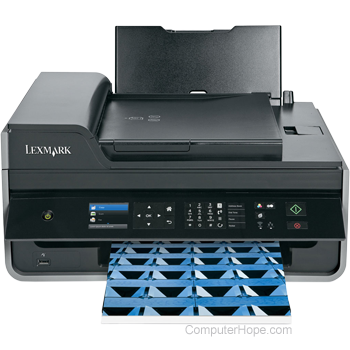
Some companies may try to sell additional add-ons when purchasing a laptop. Unless you have done your research on the additional add-ons, do not consider any add-ons. While in some cases it may be beneficial to get a printer, scanner, camera, or PC cards with a computer, you may be paying a premium for the add-on. In the case of a printer, you may have to pay a premium for ink in the future.
Do your research to ensure that if you get additional hardware or add-ons, the hardware suits your needs, and it does not end up being something that isn't used.
Free add-ons? Some computer companies may entice you to purchase a laptop by giving you free add-ons. These add-ons may be advertised as free; however, they often are not free. Ensure the add-on price is not being added to the overall laptop price.
Documentation
While most manufacturers today are reducing the documentation included with their laptops, it is still a good idea to find out what documentation, is included.
Some laptop manufacturers include paper documentation or paper inserts; however, does that information include upgrading the laptop in the future? How do you connect cables, peripherals, and accessories to the laptop? Is there documentation on how to use any included software?
It is important to distinguish between paper documentation and on-line documentation. On-line documentation, which is more common today, is information available on the Internet, usually from the manufacturer's website. If the information is available on the Internet, review that information to make sure it suits your needs before purchasing the computer.
Location
We use location to describe different topics. First, what is the location of where the laptop is purchased? If the laptop is purchased at a local retail store, can it be returned to that store if unsatisfactory? If the laptop is purchased on the Internet or directly through the manufacturer or reseller, where can the laptop be returned if unsatisfactory?
Second, is the store location where the laptop was purchased able to service the computer? If not, where is the closest location where the laptop can be serviced?
Third, if purchasing directly from the manufacturer and shipping through the mail, how is it shipped? What is the time for the laptop to arrive at your destination? What happens if the laptop is damaged during shipping?
Refurbished

Refurbished is a term used to describe a computer, hardware device, or component in a computer that was used. It was looked at, possibly repaired, and determined to be in working order. However, because the product was used or purchased, it cannot be sold as new.
Refurbished laptops have a lower price and are a good deal for users looking for a better deal. However, compare the refurbished laptop's price to a new laptop and review all the tips on this page, as all the same rules, tricks, and tips still apply.
Service

Service is an important consideration to look at when looking to purchase a laptop, new or used. The service is how many companies describe the repair of a laptop if it, or a component in it, becomes broken. Below is a listing of recommended services.
- Is the service onsite, meaning a technician comes to your location to replace or fix a bad component? If the service is onsite, is it for the complete time of the warranty?
- If onsite is not offered, what is and for how long?
- Can the laptop be taken to a local service center? If yes, what is the closest authorized service center?
- What is the time frame the service takes to occur? For example, if the laptop has a bad component, what is the time it takes for a technician to come onsite and replace that component, or what is the time it takes to have the laptop sent in to be fixed? Finally, if that time frame is not accomplished, what is the company willing to do? Would they be willing to provide you with a loaner laptop?
- Because the laptop is portable, is International Service available? This allows users in a different country to have their computer fixed in that country.
Software
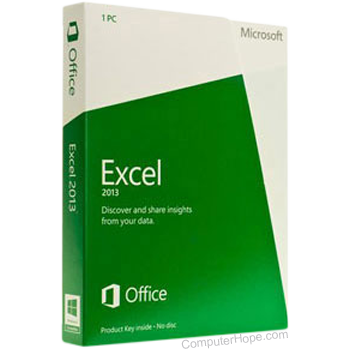
For many computer users, especially new users, the software is an important consideration when purchasing a new laptop. While there is software that we highly recommend looking for when purchasing a laptop, like a word processor or spreadsheet program, some companies may over-hype the software package included with the laptop. Below is a listing of what to look for when looking at the software included with a laptop.
- Does the software include Microsoft Office or Corel Suite? These packages include a word processor and spreadsheet program. For the majority of all users, this should be an important consideration.
- Is the software full versions of that software, or only software demos or shareware programs?
Support

While Computer Hope is available for support, manufacturer support for most users is another important consideration. If an issue arises with the laptop, you must be able to contact a support representative. Things to consider when looking at the support options for a laptop are listed below.
- Is support open 24 hours, seven days a week? If not, what are their hours?
- Is support open on holidays? If not, what days are they closed?
- What support options are available? Phone? E-mail? Web? Chat?
Upgrade
While this option may not be considered at first when purchasing a laptop, it is an important consideration. Below is a listing of different options to look for when looking to upgrade a laptop.
- Can the RAM be upgraded? If available to upgrade, what are the maximum amounts, or is it specified in the documentation provided with the laptop or on the Internet?
- Do the upgrades require a service center to install?
Warranty

Finally, what warranty is offered by the laptop manufacturer? How long is the warranty? Does the warranty cover hardware and software issues?
Warranty can cause frustrations for most users. We highly recommend looking for a laptop with at least a one-year warranty. Many cheap laptops only come with a 90-day warranty, meaning if a part goes bad after only 90 days, you pay for the part and the service. This may not be an issue for users who only need a cheap laptop and are willing to pay for parts and service.
Refurbished laptops usually only have a 90-day warranty.
Scams
Watch out for the scams and tricks below when buying a laptop.
Get what you pay for
Make sure you are paying for what you get. It is known that some on-line, less reputable companies may list a laptop as having a specific processor speed, amount of RAM, or specific size hard drive. However, the laptop has a slower processor speed, less RAM, or a smaller hard drive.
To determine the laptop's actual hardware specifications, get the brand and model number of the laptop, then search online for that brand and model number. Review the specifications for that brand and model on a reputable website, like Amazon, Best Buy, or Newegg, and verify their listed specifications match what the company selling the laptop claims are the specifications.
Legal software
When purchasing a laptop, ensure it comes with legal software. Many end-users or small computer companies who build or sell computers may not provide you with legal copies of the software, which is illegal. Verify the software that came with the laptop is on a standard CD and not a burned CD. A burned or home-made CD looks different, with a gold or green bottom. Ensure that if the software requires a product key, it is included with the laptop. An example of software that includes a product key is Microsoft Windows and Microsoft Office.
If the laptop includes demo or trial software, like a Microsoft Office trial version, a product key may not come with the laptop. A product key for trial software is often obtained when the software is purchased after the trial version expires.