
Computer Hope

Other Pages

Home
Site map
Computer help

Dictionary
News
Q&A
What's new

Tools

E-mail this page
Print Preview
Edit this page


Reference number: CH000879

How do I determine how much space my floppy disk has?

Question:

How do I determine how much space my floppy disk has?

Answer:

Windows 95, 98, NT 4.x, 2000, ME, and XP users
MS-DOS users and Windows 3.x and NT 3.x users
Linux and Unix users

Windows 95, 98, NT 4.x, 2000, ME, and XP users

  1. From the Windows desktop open My Computer
  2. Within My Computer highlight and right-click the 3 1/2 Floppy (A:) Drive.
  3. From the menu that appears after right-clicking the drive click Properties.
  4. The Properties window will display the used space, free space, and the total capacity of the drive, similar to what is shown below.
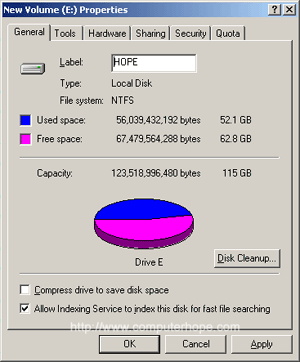
In addition to the steps listed above you can also still view the available space through MS-DOS

MS-DOS users and Windows 3.x and NT 3.x users

Open the MS-DOS prompt. Additional information about getting into the MS-DOS prompt can be found on document CHDOS.

To determine the available space on a hard disk drive using MS-DOS we recommend that the 'dir' command be used.

At the MS-DOS prompt type:

dir <press enter>

At the end of the directory listing you will see information similar to the below example.

  2 file (s)                         578 bytes
15 dir (s)               16,754.78 MB free

As you can see above the hard disk drive has over 16GB of free space. If you wish to see all files and how much space they are occupying type the below commands.

cd\
dir /s

The above command will list all files on your computer (except the hidden files) and give you the total amount of disk space they utilize as well as the free disk space.

See our dir command page and our cd command page for additional information about each of these commands. 

Linux and Unix users

If you're running Linux / Unix or a variant see document CH000624 for additional information about determining available disk space on a drive.

Additional information:

  • See document CH000369 for additional information about determining the available space on a hard disk drive.
  • For information about determining the size of one or more files see document CH000769.


Index


Category:
Floppy drive help

Companies:
Click here

Related Pages:

Resolved

Were you able to locate the answer to your questions?

Home - Computer help - Contact - Dictionary - Links
Link to Computer Hope - Bookmark Computer Hope