
How to determine the size of a file or folder
To find the size of a computer file or folder, select your operating system in the list below and follow the instructions.
Microsoft Windows users
Below are the different steps you can take to determine the total size of a file, multiple files, or folder on a computer running Microsoft Windows.
- Locate and highlight the file(s) or folder that you want to determine the size.
- Right-click the file and click Properties.
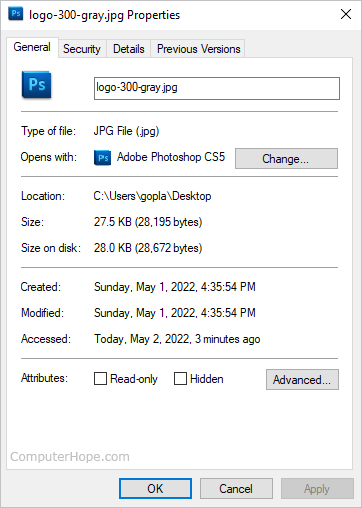
- The image below shows that you can determine the size of the file or files you have highlighted from in the file properties window. In this example, the chrome.jpg file is 18.5 KB (19,032 bytes), and that the size on disk is 20.0 KB (20,480 bytes).
or
- Open My Computer or Windows Explorer.
- Make Windows display file properties by clicking View at the top of the window, and then selecting Details. Once this action is completed, Explorer displays all your files, their sizes, type, and last modified date.
or
- Open My Computer or Windows Explorer.
- Move to the directory containing your file.
- To see the total space of the current directory, view the size of the directory on the right side of the status bar. Otherwise, highlight the file you want to see the size of and look at the status bar.
You can also select multiple files and once all the files you want are highlighted, right-click any of the highlighted files and choose Properties. In the Properties window, it shows the size of all files combined. See: How to select or highlight multiple files and folders.
macOS users
- Navigate to the file or folder whose size you want to view. If you're unsure of its location, you can use the Finder application in the Dock at the bottom of your screen.

- Click the file or folder so that it is selected.
- Press Command+I on your keyboard.
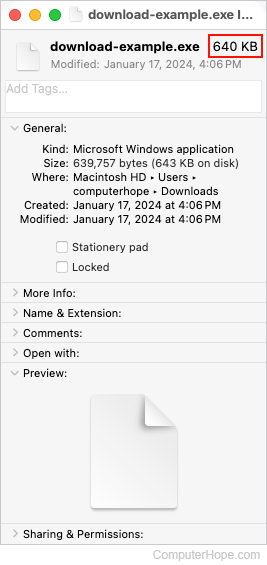
- A window opens showing the size of the file or folder near the top.
MS-DOS and Windows command line users
The following instructions contain information on the different methods a user can utilize to view the size of a file or files in MS-DOS.
- Move to the directory of the file whose size you want to view.
- Once in the directory, perform one of the following commands.
dir myfile.txt
The command above shows the size of the single file myfile.txt.
dir *.txt
The command above lists all text files in the current directory, as shown in the picture below.
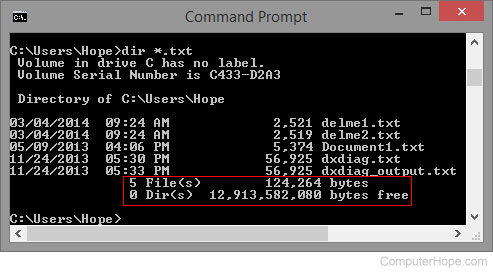
As seen in the example above, this shows there are five txt files in the current directory with a total size of 124,264 bytes.
Linux and Unix users
Below are some different methods a *nix user can use to determine a size of a file on their computer.
- Move to the directory of the file whose size you want to view.
- Once in the directory, perform one of the following commands.
Command one example
ls -l help.html
Command one output
-rw-r----- 1 comphope www 11567230 Nov 24 01:12 log.txt
In the output example above, the 11567230 is the size of the file. For a more user-friendly output, use the du command, as shown below.
Command two example
du -h log.txt
Command two output
12M log.txt
To see the total size of multiple files, type the following.
du -ch *.txt
The example command above lists every .txt file in the current directory. It also lists the size of each file and the total size of all the files combined.