
How to add or remove a shortcut on the Windows taskbar

With the introduction of Windows 7, you can pin a program to the Windows taskbar. Pinning creates a shortcut that allows users to open a program from the taskbar using a mouse or keyboard shortcuts. This feature is beneficial because you don't have to minimize all your windows like you would to click a desktop shortcut.
Quick Launch is a feature that was included with Windows 98 to Windows Vista. It works the same way as pinning.
To proceed, select your version of Windows in the list below and follow the steps.
Windows 11
- Pin an already open program.
- Pin from Start menu.
- Drag-and-drop a shortcut.
- Removing shortcuts from the taskbar.
Pin an already open program
If the program is open, pin it to the taskbar by right-clicking its icon on the taskbar and selecting Pin to taskbar from the pop-up menu. Once pinned to the taskbar, it always appears on the taskbar, even when the program is closed.
Pin from Start menu
- Press the Windows key to open the Start menu.
- In the Start menu, click the All apps option.
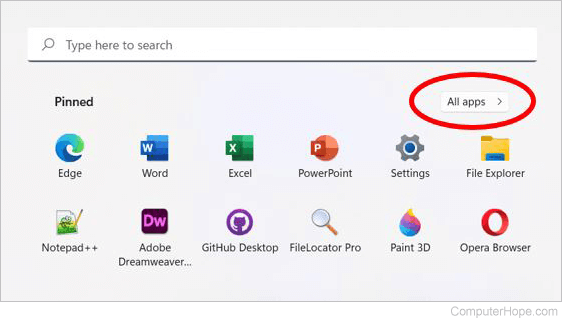
- In the apps list that appears, scroll down to find the program you want to pin.
- Once you locate the program, right-click it, select More in the pop-up menu, and then Pin to taskbar.
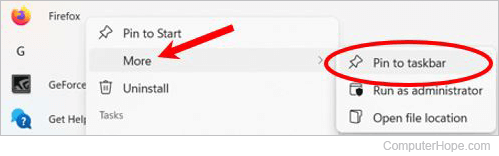
- When you're done, the program's shortcut is visible to the right of the search bar.

Drag-and-drop a shortcut
Locate the shortcut you want to pin. Then, drag-and-drop the shortcut to the taskbar.
Removing shortcuts from the taskbar
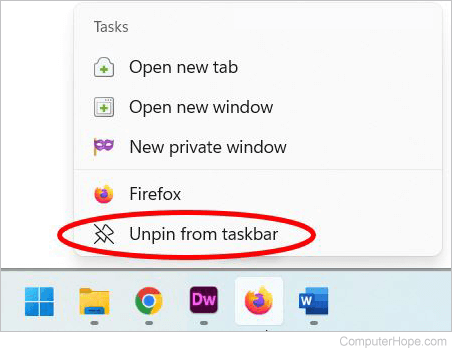
Right-click any shortcut icon on the taskbar and select Unpin from taskbar.
Windows 7, 8, and 10
- Pin an already open program.
- Pin from Start menu.
- Drag-and-drop a shortcut.
- Removing shortcuts from the taskbar.
Pin an already open program
If the program is open, pin it to the taskbar by right-clicking the icon on the taskbar and clicking Pin to taskbar. Once pinned to the taskbar, it always appears on the taskbar, even if the program is closed.
Pin from Start menu
- Press the Windows key to open the Start menu. You see a menu similar to the one below:
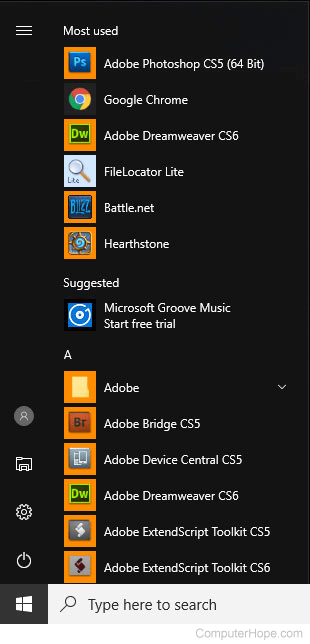
- Scroll down the apps list to find the program you want to pin.
- Once you locate the icon, right-click it, then move your cursor over More and select Pin to taskbar.
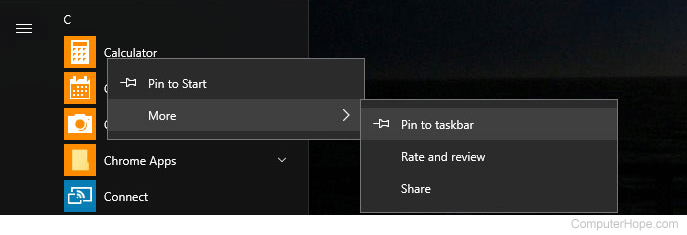
- When you're done, you'll see the program's shortcut to the right of the search bar.

Drag-and-drop a shortcut
Locate the shortcut you want to pin. Then, drag-and-drop the shortcut to the taskbar.
Removing shortcuts from the taskbar
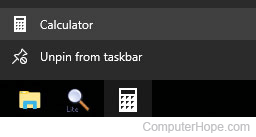
Right-click any shortcut icon on the taskbar and select Unpin from taskbar.
Windows 98, 2000, XP, and Vista

Adding a program to Quick Launch
- Right-click an empty portion of the Quick Launch tray.
- Select Open folder to display the icons stored in the Quick Launch directory.
- Once the Quick Launch folder is open, create new shortcuts in it or drag-and-drop existing ones.
Adding shortcuts to Quick Launch
Drag-and-drop the shortcut you want to add onto the Quick Launch section of the taskbar.
Removing shortcuts from Quick Launch
To remove icons from Quick Launch, right-click the icon you want to delete, and then Delete.