
How to transfer files from a smartphone to a computer
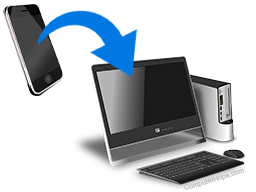
If you have a smartphone, and you've taken a lot of photos and videos, you may want to save, transfer, or upload those files to your computer.
Below are steps to help you transfer files to your computer from your smartphone.
In some instructions, your smartphone must connect to your computer with its included data cable. Use only an official cable (manufactured by the company that makes the phone). Second-hand cables might work for charging the phone, but are unlikely to work for data transfers.
Android to Windows
If your computer is running Microsoft Windows, and your smartphone runs Android, check with your smartphone manufacturer for custom instructions. For instance, if you have a Samsung Galaxy phone, check Samsung's website for up-to-date, model-specific instructions, software, and steps to take.
Many Android phones can also connect your device as USB storage.
If you're using Windows 10 version 1803 (April 2018 update) or newer, and your computer has Bluetooth, use Nearby Sharing to wirelessly transfer files to or from your phone.
iPhone to Mac or Windows
If your smartphone is an iPhone, use iTunes to transfer files. If iTunes is not installed on your computer, download it from the App Store, or the iTunes page for Windows computers.
Additionally, if you're using an iPhone and a Mac computer, use the AirDrop function to wirelessly transfer files between them. For more information, refer to the official AirDrop instructions from Apple.
Connecting as external USB storage
If you're using Microsoft Windows or Linux, access your smartphone's storage like any other USB (universal serial bus) drive. When your smartphone is connected to your computer, the phone appears in Windows File Explorer or macOS Finder, like any other external removable storage devices.
In most cases, you must grant permission on the phone before your computer can see the files. For instance, on an iPhone, you may see the following message.
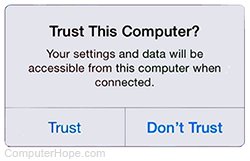
If you tap Trust, the phone allows the computer to view its files. Using Windows File Explorer, access your files by choosing Apple iPhone under This PC. In macOS Finder, you see your smartphone listed in the left navigation panel, with your other mounted volumes, and also a shortcut on your desktop.
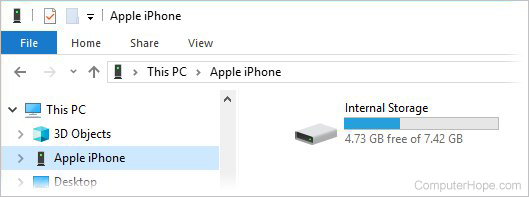
Copy your files to the desired location on your computer.
Your phone only shares files you've created, like your photos and videos. Your phone does not share its protected operating system files.
Alternative methods
There are other ways to transfer files from your smartphone to your computer, including the following options.
Cloud storage: Use a cloud file storage system to transfer files, such as Dropbox, OneDrive, or Google Drive. On iPhones, iCloud is the default cloud storage service included with iOS.
Apps: You may also try using a third-party wireless file transfer app, such as AirDroid and Pushbullet.