
File Explorer
Alternatively called Windows Explorer or Explorer, File Explorer is a file browser found in every version of Microsoft Windows since Windows 95. It is used to navigate and manage the drives, folders, and files on your computer. The image below shows File Explorer in Windows 10.
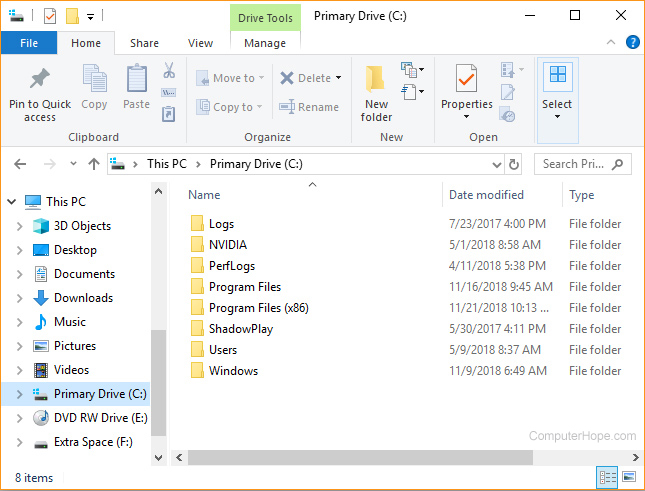
Don't confuse File Explorer with Microsoft Internet Explorer, the default web browser on Microsoft Windows 8.1 and earlier versions of Windows.
How to open Windows Explorer
There are several ways to open a new Explorer window, which vary slightly depending on which version of Windows you are running.
If you repeat any of the options below, you can open two or more separate Explorer windows.
In all versions of Windows
- Press Windows key+E (hold down the Windows key and press E).
- Click Start, select Run (or press Windows key+R), type explorer or explorer.exe, and press Enter.
- If displayed on the Windows desktop, click or double-click the My Computer icon (named Computer in Windows Vista & 7, and This PC in Windows 8 & 10).
In Windows 10
- Press Windows key+X to open the Power User Tasks Menu, then select File Explorer (or press E).
- Click Start, select Windows System, then File Explorer.
In Windows 8 and 8.1
Right-click the bottom-left corner of the screen to open the Power User Tasks Menu and select File Explorer (or press E).
In Windows 7 and earlier versions
Right-click Start and select Explorer or Open Windows Explorer.
File Explorer sections
Below is a diagram of the different sections of File Explorer, with brief explanations of each.
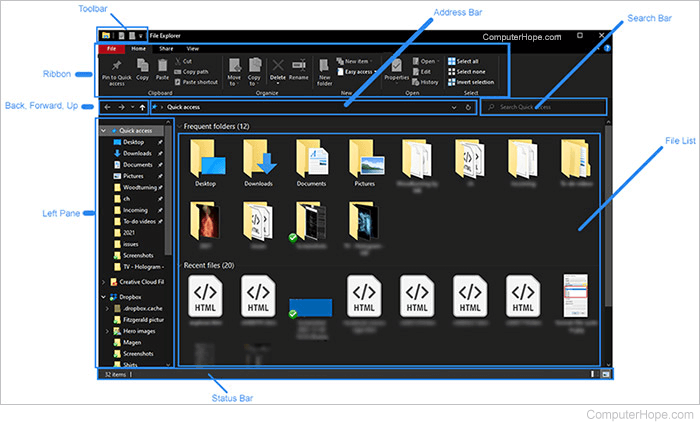
- Toolbar - A quick menu for navigating around File Explorer. You can customize what is shown here by clicking Customize Quick Access Toolbar.
- Ribbon - Each section of the Ribbon, Home, Share, and View, has multiple options for accessing features and executing actions in File Explorer. For example, Home has standard features like copy and paste, and adding a new folder.
- Back, Forward, Up - Pressing Back takes you to the last folder you were viewing. Pressing Forward, moves to the next folder. Pressing Up takes you to the drive or folder location of the object you're viewing, or to the Desktop folder, depending on your location in File Explorer.
- Left Pane - Shows all the main devices and drives connected to your computer. It also shows the network your computer is connected to, if any.
- Status Bar - Shows the number of files or folders in each location and each file or folder's size.
- Address Bar - Shows your current location in File Explorer. You can also use this to type a drive or file you want to access.
- Search Bar - Allows you to search for a drive, folder, or file name.
- File List - Displays the current list of files in the selected drive or folder.
Examples of how Windows Explorer could be used
Below are examples of what can be done in Explorer.
View and arrange files and folders
The primary purpose of the Windows Explorer is to display and arrange all files and folders on the hard drive and other computer drives.
Open a document
Microsoft made finding your documents in Windows easier by creating a My Documents folder. In Explorer, you can open My Documents and double-click a document file to open the document.
Open a program
Although most programs create a shortcut to programs in the Start menu or Start Screen after installing, you can also open a program through Explorer. To open a program in Explorer, follow the following steps.
- Browse the Program Files folder by opening the C: drive and then double-clicking the Program Files folder.
- In the folder list, find the program you want to open and double-click its folder.
- In the program's folder, find the executable file and double-click that file to run the program. Since file extensions may be hidden, you can determine an executable by looking for a file with the same name as the program.
View file details
Explorer also shows file details such as when the file was created and modified, file size, and file type.
When viewing files in Explorer, clicking the column headers lets you sort files by that columns order. For example, clicking the "Date modified" column header arranges files by when they were last modified.
Search for a file or folder
In the Search tab, you can find files or folders on your computer. Press F3 to open the search at any time while in Windows Explorer.
Other system tasks and functions
Using Windows Explorer, you can also perform any of the system tasks listed below.
- Copy a file: How to copy files.
- Move a file: How to move files and folders on the computer.
- Rename a file: How to change or rename a file, folder, or directory.
- Delete a file: How to delete a file, directory, or folder.
- Change and view drives: How to see all drives available on the computer.
- Create a shortcut: How to create a Windows shortcut.
What did Explorer replace?
Before Windows 95, computers using Windows 3.11 used File Manager to manage the files on their computer.
Where is Windows Explorer on macOS, Chromebook, and Linux?
Windows Explorer is only found on the Microsoft Windows operating system. For the macOS, ChromeOS, and Linux versions, see below.
Apple macOS
Users familiar with Apple computers can think of Explorer as the Windows equivalent of the macOS Finder. If you're using an Apple computer, see our Finder page to help explore the files on your computer.
ChromeOS
ChromeOS uses My Files as the equivalent to Windows Explorer. To open My Files, click the App launcher in the bottom-left corner of the screen. In the App Launcher, click Files.
Linux
With Linux, there are multiple variants, each with a file explorer equivalent to Windows Explorer.
My Computer, Operating system terms, Preview Pane, View buttons