
Maximize

Nearly all open windows in a GUI (graphical user interface) have resizing options. Maximize allows users to enlarge a window, usually filling the entire screen or the program window where it is contained.
When a window is maximized, it cannot be moved until it is reduced in size using the Restore button. Often, you can get this effect by clicking the same button you used to maximize the window or by double-clicking the title bar.
What does the maximize button look like?
As pictured, the Windows 95 maximize button (or maximize box) is displayed as a single box in the top-right of a window.

Helpful maximize tips
You cannot resize a window if it's maximized or fullscreen.
Users with a Microsoft Windows keyboard can press Windows key+↑ or Windows key+↓ to resize a window.
Why can I not maximize a window?
Not all windows can be maximized. If none of the above steps help with maximizing a window or the maximize button is unavailable, the window cannot be maximized.
How to restore down a maximized window
When a window is full screen, the button becomes a restore down button, which allows it to be restored to a window.
Maximize for Apple users

With Apple macOS, the maximize button is represented as a yellow button found in the top-left corner of the window. If this button is missing, the program does not support a maximized window. The picture shows the red, yellow, and green circles on a window with all three options.
How do I maximize a minimized window?
When a maximized program window is minimized, it is hidden from view. To restore the window, click the program's icon on the Windows Taskbar at the bottom of the screen. In macOS, click the program's icon in the dock.
To maximize the current window, press Alt+Spacebar. Once the window properties drop-down menu is displayed, press X to maximize the window.
You can also use the keyboard shortcut Alt+Tab that switches between windows in Microsoft Windows to restore a minimized window.
Windows 3.1 and 3.11 maximize
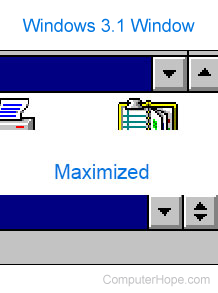
Microsoft Windows 3.1 and 3.11 featured an up arrow in the top-right corner of the window. Clicking this button caused the window to maximize. When clicking the up arrow, the window would become maximized, and clicking the down arrow would restore the maximized window to a window. Clicking the down arrow again would minimize the window.
Close, Fullscreen, Max, Minimize, Operating system terms, Resize, Restore, Window, Zoom