
Minimize

Alternatively called a collapse box, minimize box, and minimize button, minimize is an action in GUI (graphical user interface) operating systems to hide a window, but keep the program running in the background.
How to minimize
In recent versions of Microsoft Windows, the minimize button is represented by an underscore or dash in the top-right corner of the window. When minimized, the program remains on the taskbar, but not visible. In the early versions of Windows 3.x and other operating systems and programs, the minimize button may be represented by a small down arrow.
The image below shows an example of a window in Microsoft Windows with the minimize button in the top-right corner.

Where do minimized programs go?
In Windows, when a program is minimized, it may seem as though it has disappeared. Fortunately, that is not the case. Minimized programs may be located and accessed from the Windows taskbar, which is located at the bottom of any Windows desktop. The following image shows examples of various Windows taskbars containing minimized programs.

Clicking any program icon on the taskbar that is minimized restores the window. If you cannot find a minimized program, try using the Alt+Tab shortcut.
Some programs may be minimized to the Windows Notification Area.
Minimize vs. resize
To keep the window open, but not have it fullscreen, use the resize button to make it a window instead of fullscreen. Once set as a window, you can resize the window to make it bigger or smaller.
Minimize keyboard shortcut
Below are keyboard shortcuts that minimize windows on a computer without using a mouse.
Users with a Windows keyboard can press Windows key+M at the same time to minimize all open windows. To undo the minimize on all windows, press Windows key+Shift+M.
With Windows 7, Windows 8, and Windows 10, to resize the active window, press Windows key+↓ on the keyboard, and if pressed again, it is minimized.
In all versions of Windows, you can minimize windows only using the keyboard by pressing Alt+spacebar. And in the window properties drop-down menu, press N to minimize the window.
Some programs (e.g., Microsoft Excel) have keyboard shortcuts for minimize. In the case of Microsoft Excel, the minimize keyboard shortcut is Ctrl+F9.
How to minimize all windows and get to the desktop
When you minimize a program, it shows any other open program that was behind its window. To minimize all open windows at the same time, there are two methods:
- Press Windows key+D on your keyboard.
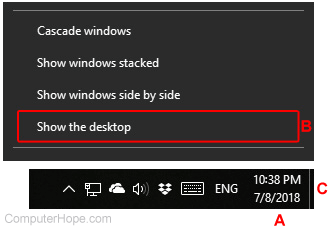
- Right-click the time and date in the lower-right corner of the screen (above A). Then, select "Show the desktop" (B) from the menu. Or, click the small tab (Aero peek) on the far-right side (left of C).
How to minimize on an Apple computer

In Apple macOS, the minimize action can be done by pressing the green circle button in the upper-right or left corner of the window. The picture shows a window with the red, yellow, and green circle.
When a program is minimized on an Apple computer, it is sent back down to the Dock.
Close, Collapse, Desktop, Hidden, Maximize, Operating system terms, Restore, Shake, Window