
Title bar
The title bar is a horizontal bar located at the top of a window in a GUI (graphical user interface). It displays the title of the software, name of the current document or file, or other text identifying the contents of that window. For example, in the picture below, the title bar displays the program name "TextPad" and the document name "Document1" that is currently being edited.

Besides giving a description of the open program or window, the title bar may also contain other useful features that depend on the operating system and program showing the title bar.
If you're using Microsoft Windows 8 and the title bar is missing, move the mouse pointer to the top of the screen to reveal it.
Basic features of the title bar
As illustrated in the picture above, the standard title bar has a minimize, maximize, and close button, usually on the right side. Also, in the top-left corner of a program's window, there is an icon that shows these options when clicked.
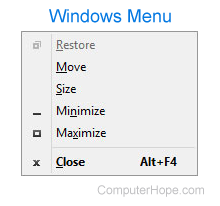
In Microsoft Windows, pressing Alt+Spacebar shows you the window menu options, as shown in the picture. Using this keyboard shortcut, you can perform any of the title bar options without using a mouse.
Extra features and functions of a title bar
Below is a list many of the title bar's functions. Remember that not all of these are available in all operating systems and programs.
- Press and hold the mouse button on the title bar to move the window.
- Double-click the title bar to maximize the window or set the window into window mode.
- Windows 7 introduced side-by-side windows, a feature that "snaps" windows to the side of the screen. To use side-by-side windows, click-and-drag the title bar to any edge of the screen.
Menu bar, Operating system terms, Title, Toolbar, UI, Window