How to enable or disable JavaScript in a browser

Today, nearly all Internet browsers have JavaScript installed and enabled by default. Many features of a website are enhanced or made possible by JavaScript programs that run in your browser. Consequently, if you disable JavaScript, certain websites may not function as intended. To learn how to enable (unblock) or disable (block) JavaScript, select your browser from the list below and follow the steps.
Java and JavaScript are different. If you need information about Java or any of its versions, see our Java definition.
To check if JavaScript is currently enabled, see our JavaScript definition for an example script that runs in a JavaScript-enabled browser.

Google Chrome
To enable or disable JavaScript in Google Chrome, follow these steps.
- Open Google Chrome.
- In the upper-right of the Chrome window, click the
 icon.
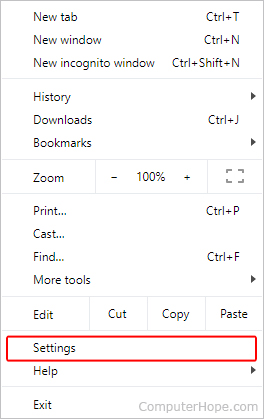
icon. - Select Settings from the drop-down menu.
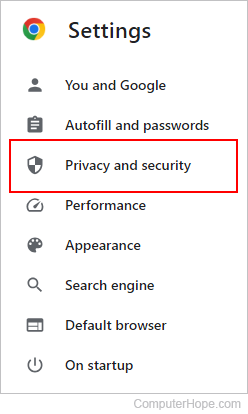
- On the left side of the screen, click Privacy and security.
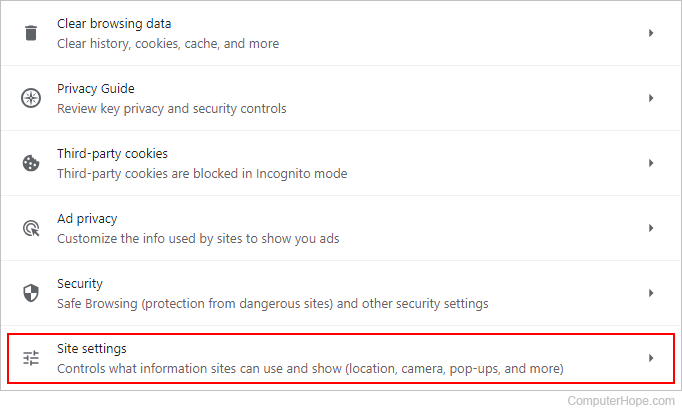
- Expand the Site Settings option.
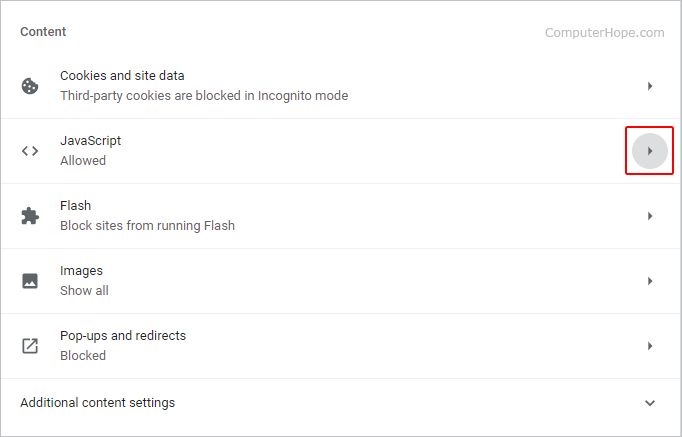
- On the Site Settings page, scroll to the bottom of the screen. Under the Content section, click the JavaScript option.
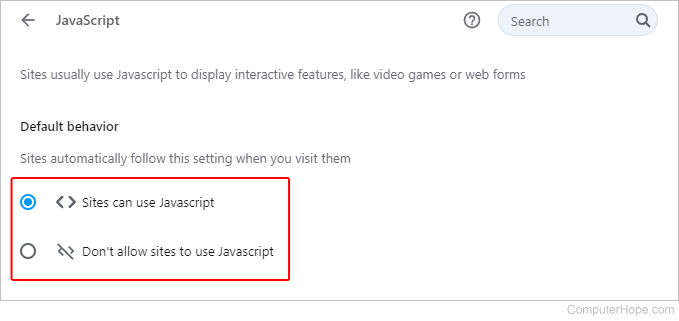
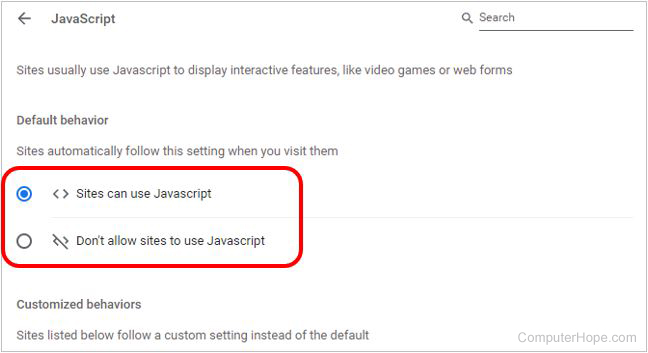
- Under Default behavior, click the Sites can use Javascript radio button to enable JavaScript, or click the Don't allow sites to use Javascript radio button to disable JavaScript.
Allow or block JavaScript on specific websites
In the Allow or Block section, click the  button. Then, type or paste the URL (uniform resource locator) of the website that you want to allow or block JavaScript.

Mozilla Firefox
To enable or disable JavaScript in Firefox, follow these steps.
- Open Firefox.
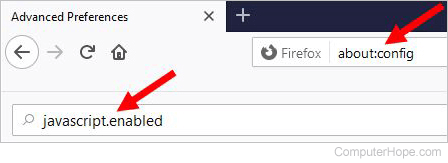
- In the address bar, type about:config and press Enter.

- Click the Accept the Risk and Continue button in the center of the screen.

- In the Search preference name text field, type javascript.enabled.
- For the javascript.enabled search result, click the Toggle
 icon on the far right. The true value changes to false to indicate JavaScript is disabled.
 - To re-enable JavaScript, repeat these steps, changing false to true.

Microsoft Edge
To enable or disable JavaScript in Edge, follow these steps.
- Open Microsoft Edge.
- In the upper-right corner of the screen, click the
 icon.
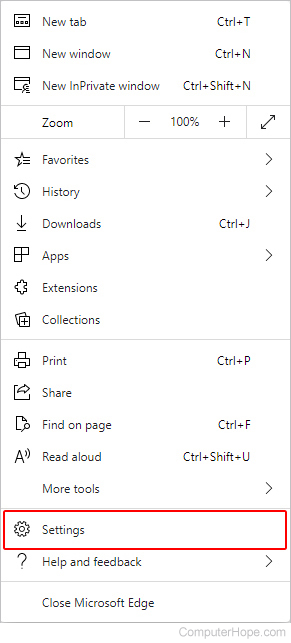
icon. - At the bottom of the Settings and more menu, select Settings.
- On the left side of the screen, select Cookies and site permissions.
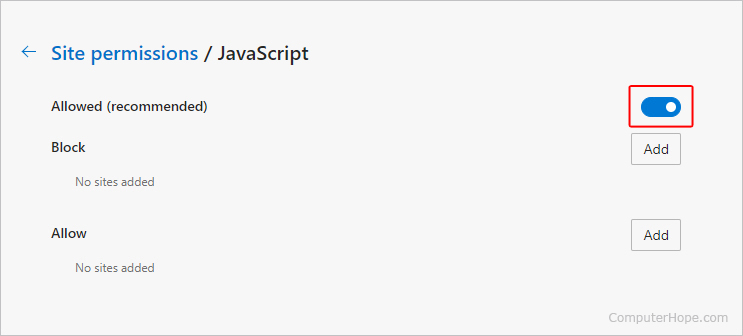
- Under the Site permissions section, click the box labeled JavaScript.

- On the Site permissions / JavaScript screen, use the toggle switch to enable and disable JavaScript.

Microsoft Edge Legacy
By default, JavaScript is enabled in the Microsoft Edge Legacy browser. The Creators Update for Windows 10 removed the ability to manually enable or disable JavaScript.

Internet Explorer
To enable or disable JavaScript in Internet Explorer, follow these steps.
- Open Internet Explorer.
- Click Tools
 in the upper-right corner of the browser window.
 - Select Internet Options from the drop-down menu.
- In the Internet Options window, click the Security tab.
- In the Security tab, click Custom Level button.
- Scroll down the list (close to the bottom) and locate Active Scripting. Select Disable, Enable, or Prompt to adjust your JavaScript settings.

Android phone & tablet
To enable or disable JavaScript on an Android mobile device, you must access the browser settings. As there are many different browsers on Android devices, you may need to use some intuition to access the settings. The following instructions are for Google Chrome.
- Open Google Chrome.
- In the upper-right corner, click the
 icon.
icon. - On the drop-down menu, tap the Settings option.
- Under the Advanced section, tap Site settings.
- Tap JavaScript.
- Move the slider
 to toggle JavaScript on or off.

Safari (macOS)
To enable or disable JavaScript in Safari on an iMac or MacBook, follow these steps.
 selector and choose Settings....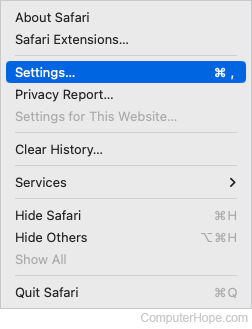
- Click the Security tab at the top of the Advanced window.
- On the Security tab, next to Web content, click the check box next to Enable JavaScript box to toggle it on or off.


Safari (iPhone & iPad)
To enable or disable JavaScript in Safari for iOS or iPadOS, follow these steps.
- Tap the Settings
 icon on the home screen.
 - On the Settings screen, scroll down and tap Safari.
- On the Safari screen, scroll down to the bottom and tap the Advanced option.
- On the Advanced screen, tap the toggle to the on
 position to enable JavaScript or the off
  position to disable JavaScript.

Opera
To enable or disable JavaScript in the Opera browser, follow these steps.
- Open Opera.
- Click Customize and control Opera
 in the upper-left corner of the browser window.
 - Select Settings from the drop-down menu.

- On the left side of the tab that appears, click Privacy & security.

- In the Privacy and security section, click Site Settings.
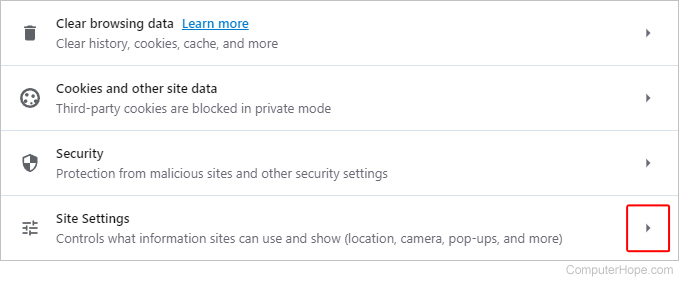
- On the Site Settings page, under the Content section, click the JavaScript option.
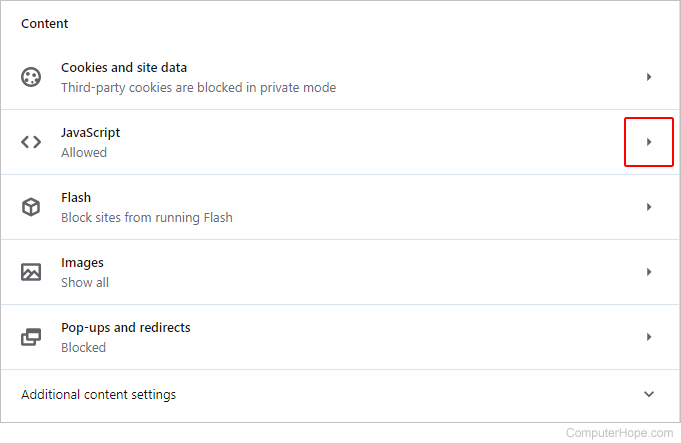
- In the Default behavior section, click the circle next to Sites can use Javascript to turn it on or Don't allow sites to use Javascript to turn it off.