
CSS
CSS may refer to any of the following:
1. Short for cascading style sheets, CSS describes reusable styles for presenting documents written in a markup language. Its concept was originated by Håkon Wium Lie in 1994. In December 1996, CSS was made a specification by the W3C, and today allows web developers to alter the layout and appearance of their web pages. For example, CSS can change the font used in certain HTML elements and their size and color. A single CSS file may be linked to multiple pages, allowing a developer to change the appearance of all the pages at the same time.
The following box contains an example of using CSS code to define fonts, the color of hyperlinks, and the color of a link when the mouse cursor hovers over. In this specific example, we are only changing the HTML (hypertext markup language) tags <a> and <body>, rather than creating any new class or id selectors.
body {
 font: normal 100% "trebuchet ms", Arial, Helvetica, sans-serif;
}
a {
 color: #000000;
}
a:visited {
 color: #005177;
}
a:hover {
 color: #005177;
}
The CSS code in the box above can be inserted into the head section of a page's HTML with the <style> tag shown below. However, realize that performing this action only applies these changes to a single page.
<style>
<!--above code inserted here-->
</style>
To use the CSS code on multiple pages, we suggest storing it in a separate CSS file and link the CSS file on every page. For example, the CSS code shown in the first box on this page can be copied and pasted into a file with the .css file extension.
A CSS file can be created using any text editor or even Notepad if you're using Windows.
After the file is saved, it must be linked in the head of the HTML code using the <link> tag. The following box shows an example of this element in use.
<link rel="stylesheet" Type="text/css" href="URL or path to css file here">
If you named the CSS file example.css, and it's in the same directory as the HTML file it's being loaded from, the following line would link the CSS file.
<link rel="stylesheet" Type="text/css" href="example.css">
CSS3 is the version of CSS (Cascading Style Sheets) that replaces CSS2. It introduces new selectors and properties that allow for more flexibility with page layout and presentation. Some updates, such as the box-shadow property (which allows an element drop shadow), allow visual effects to be applied without creating special images.
Is CSS a markup language?
No. CSS is a style sheet language that gives appearance changes to a markup language. For example, HTML creates the basic layout of a web page, such as this paragraph of text. CSS defines the font, font size, font weight, position, and other visual settings.
2. Short for Content Scramble System, CSS is a protection scheme used to help protect copyrighted material stored on DVDs from being copied.
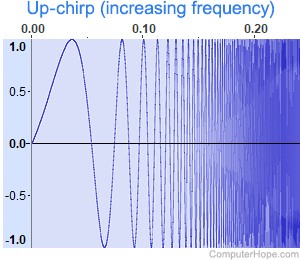
3. Short for chirp spread spectrum, CSS is a spread spectrum technique that transmits information in periodic bursts of variable frequency. These chirps are highly resistant to channel noise and multipath degradation, making them ideal for low-power, low-bitrate, long-distance communication. CSS is used in some LPWAN (low-power wide-area network) technologies to provide signal resilience in a distributed mesh of low-power transmitters, such as those found in IoT (Internet of Things) devices.
Class, Computer acronyms, Cross-site scripting, CSS shorthand, Div, DRM, <head>, Inline, Programming terms, Sprite, Style, Style sheet, Web design, Web design terms, XSL