
How to use ping, winipcfg, and other network commands
Below is a listing of the various network related commands used in MS-DOS, Windows command line, Linux, Unix, and other operating systems. Each command includes additional information to what the command does, the command's syntax, and miscellaneous information.
If you are not the root or admin of a computer, these commands may not work.
Arp
Display or manipulate the ARP (Address Resolution Protocol) information on a network device or computer.
Finger
The finger command available in Unix and Linux variants allows a user to find sometimes personal information about a user. This information can include the last time the user logged in, and when they read their e-mail, etc. If the user creates a .PLAN or other related file, the user can also display additional information.
Hostname
The hostname command displays the hostname of the computer.
Ipconfig
Ipconfig is an MS-DOS utility that can be used from MS-DOS and an MS-DOS shell to display the network settings currently assigned and given by a network. This command can be utilized to verify a network connection and verify your network settings.
Windows 2000 users should use this command to determine network information.
Nbtstat
The nbtstat MS-DOS utility that displays protocol statistics and current TCP/IP connections using NBT (NetBIOS over TCP/IP).
Net
The net command is available in MS-DOS and Windows and is used to set, view, and determine network settings.
Netstat
The netstat command displays the TCP/IP network protocol statistics and information.
Nslookup
The nslookup MS-DOS utility lets users do a reverse lookup on an IP (Internet Protocol) address of a domain or host on a network.
Pathping
Pathping is an MS-DOS utility available for Microsoft Windows 2000 and Windows XP users. This utility lets users find network latency and network loss.
Ping
Ping is one of the most commonly used network commands that let you ping a network IP address. Pinging an IP address helps determine if the network card can communicate in the local network or outside network.
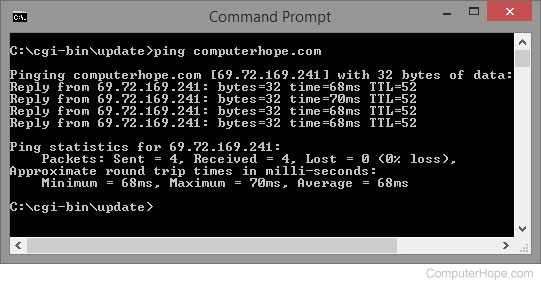
Route
The route MS-DOS utility enables computers to view and modify the computer's route table.
Tracert and traceroute
The tracert command in MS-DOS and Windows (known as traceroute in Unix-like operating systems) is a useful tool for diagnosing network issues. It displays a list of how a network packet travels through the network and where it may fail or slow down. Using this information you can determine the computer, or network device causing your connectivity issue.
Whois
The whois command available in Unix and Linux variants helps allow a user to identify a domain name. This command provides information about a domain name much like the WHOIS on network solutions. Sometimes, the domain information are provided from Network Solutions.
Winipcfg
The winipcfg command available in Windows allows a user to display network and network adapter information. Here, a user can find such information as an IP address, Subnet Mask, Gateway, etc.
Windows 2000, Windows XP and above users do not have winipcfg. Instead, use ipconfig.