
Root
Root may refer to any of the following:
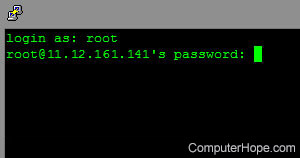
1. Alternatively called an admin, administrator, and gatekeeper, root is a superuser account on a computer or network and has complete control. See our Administrator definition for a full explanation.
2. The root, root directory, or root folder is the highest level in a directory hierarchy and includes all other directories under it. For example, in MS-DOS, the primary hard drive's root or root directory would be the C:\ directory. When working on a web page, the root directory will be your home directory or your public_html directory. On a UNIX system, the root directory is designated as "/" (a single forward slash, without the quotes).
How to get back to the root directory
To return to the root directory, use either of the commands below, depending on what command line you are using.
MS-DOS and Windows command line users
cd\
After typing the above command to view the files and directories in the root drive use the dir command.
In the Microsoft Recovery Console, set the current directory to the system root with the systemroot command.
Linux, Terminal, and Unix
cd /
After typing the above command to view the files and directories in the root drive use the ls command.
3. With Android devices, root refers to unlocking the Android device to allow more access to the core software that was blocked by the manufacturer of the device.
4. In an arithmetic sense, root may describe exponentiating a base number with a fraction. For example, 41/2 is the same as taking the square root of four, which is two because 2x2=4. Similarly, 271/3 is the same as taking the third root of 27, which is three because 3x3x3=27.
5. With linguistics, root is a word without a prefix or suffix. For example, with the words " portal, portable, and transport" the word "port" is the root word. The roots of a word help you determine the meaning of new word you may have never encountered.
Use our word and letter search to find words containing any root.
6. Root is an ability, effect, or spell in computer games that locks a target in place. For example, in the game World of Warcraft, the Mage class has a spell called frost nova that freezes an enemy in place for a few seconds. (It's super OP (overpowered)).
Administrative, Avatar, BOFH, Current directory, Document root, Full rights, Game terms, Hierarchical file system, Home, Moderator, Op, Owner, Parent directory, Power user, Remote admin, Security terms, Sysop, Web design terms