
How to connect and install a computer keyboard
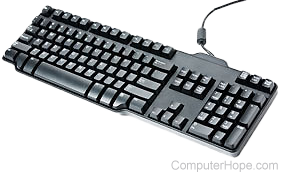
Today, almost all wired keyboards use USB to interface with a computer, but some older versions still utilize a PS/2 connector and port. If your keyboard is wireless (cordless), it communicates over Bluetooth, RF (radio frequency), or IR (infrared). The sections below contain steps for connecting keyboards with any of these technology types to a desktop or laptop computer.
Connecting a USB keyboard
When connecting a USB keyboard, the computer can be off or on during the installation.
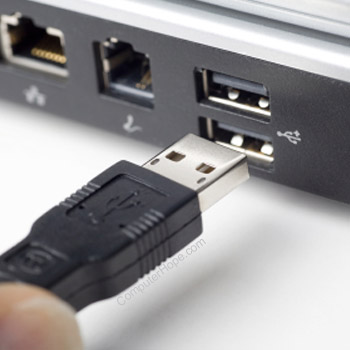
Connect the USB keyboard plug into a USB port on the back or front of the computer. If you're using a USB hub, it can also be plugged in there, but we recommend a direct connection to the computer if possible.
If you have a laptop computer, an external keyboard can also connect to one of the USB ports. However, if no USB ports are available, a hub or dongle with extra connectivity options is required.
After the keyboard is connected, it should automatically be detected and installed. If the keyboard has any special features, you may need to install the keyboard software and drivers.
Can my laptop work with two keyboards?
Yes. When you connect an external USB keyboard to a laptop, it acts as a second keyboard. In fact, both keyboards can be used at the same time.
What if my keyboard has two USB cables?
Some advanced USB keyboards (e.g., those used for gaming) have two USB cables. One of them is for the keyboard, and the other acts as a passthrough for additional USB devices. Essentially, you only need one of these cables to be connected for a keyboard to function.
Connecting a wireless keyboard
All wireless keyboards utilize a receiver that plugs into the computer (usually by USB connection) to transmit data. Connect this receiver to any USB port on the back or front of the computer. Once connected, make sure the wireless keyboard has batteries or is charged and powered on. Battery-powered keyboards have switches (usually on the back or bottom) to turn them off while not in use to conserve charge.
To communicate wirelessly with a computer, a keyboard must have line of sight to the receiver for a good signal. If the receiver has no extension cable, move it to a different port near the front of the computer (if possible).
After the keyboard is connected, it should be automatically detected and installed. If the keyboard has any special features, install the keyboard software and drivers.
How to enable the keyboard
Wireless keyboards have a power switch that allows them to be turned on and off. If a keyboard is not detected, make sure the power switch is turned to the on position. Also, if your wireless keyboard uses removable batteries, check to ensure they're still good.
Can my laptop work with two keyboards?
Yes. When you add a wireless keyboard to a laptop, it acts as a second keyboard, and both keyboards can be used simultaneously.
Connecting a PS/2 keyboard
The computer needs to be off when connecting or disconnecting a PS/2 keyboard.
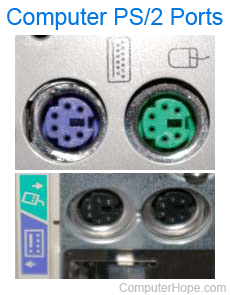
When looking at the back of the computer, you'll notice two PS/2 ports next to each other (shown right). Verify you're connecting the keyboard to the purple port. If the PS/2 ports are not color-coded, the keyboard connection is closest to the left edge (when looking at it from the back).
With vertical connections, like those shown in the bottom half of the image, the keyboard connection may be either port. Look for a small symbol next to the port to identify which one is for the keyboard.
If you're unsure which PS/2 cable is for the keyboard when under your desk, the keyboard cable is often the thicker of the two.
Do all computers have a PS/2 port?
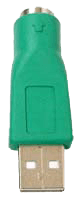
No. Newer desktop and laptop computers have moved away from the older PS/2 technology in favor of USB ports. If you have a PS/2 keyboard or device, you can get a PS/2 to USB adapter (connector) like the one shown in the picture. This adapter allows older keyboards to communicate with newer computers by acting as an intermediary between one of the USB ports and the PS/2 plug.
Install software and drivers
If your keyboard has special features like a touchpad, special buttons, or wireless functionality, model-specific drivers may need to be installed for them to work properly. To do so, use the disc provided with the keyboard, or download them from the support section of the manufacturer's website.
Troubleshooting
Do I connect the keyboard to the computer or monitor?
Most monitors don't have any ports through which you may connect a keyboard as their connectors are for video and sometimes audio signals. If a monitor has USB ports, a keyboard can be connected to the monitor. However, this feature is quite rare. If you have an All-in-One computer, it may look like you're plugging the keyboard into your monitor, but it's actually the housing for the entire computer.
Can I plug any keyboard into my computer?
Keyboards are universal, meaning they'll work with any desktop, laptop, or portable computer (PC or Mac) with the appropriate port. When you plug a keyboard into a computer, it should immediately start working. Some advanced keyboards with special keys or features may not work until additional software is installed. If the software is not compatible with your computer or operating system, you can continue to use the basic keyboard functions without the special features. If nothing on the keyboard works, you'll need to troubleshoot the keyboard with one of the links at the bottom of this section.
Can I plug my PC keyboard into my Apple computer?
Yes. All PC keyboards can be plugged into an Apple computer, and macOS will remap the modifier keys to work with the operating system. However, realize that although you have a PC keyboard connected, the Microsoft Windows keyboard shortcuts do not work with macOS. Also, if the keyboard has special keys or functions, they may not all work or activate with macOS.
How to reinstall a keyboard
As most keyboards work without installing any additional software, there isn't much to reinstall or uninstall. That said, uninstalling and reinstalling keyboard drivers manually, say, through Device Manager in Windows, can be useful for troubleshooting issues.
If your keyboard is not working or recognized, disconnect the cable from the computer, wait a few seconds, and then pug it back into the computer. If this does not help or reset the keyboard, see the following links: