
How to fix Windows blue screen errors

Before fixing a Microsoft Windows blue screen or blue screen of death error (BSoD), you must first identify what error it is, as there are multiple types of blue screen errors.
If you are experiencing a completely blue or light blue screen with no text or error message, your computer may have a bad video card or monitor, resulting in only seeing a blue screen. If possible, attempt to check if your video card is having issues or your monitor is bad.
If your computer reboots and you cannot read the text in the blue screen quickly enough, follow the steps below. If you cannot get into Windows to perform the steps below, boot the computer into Safe Mode. If you cannot boot into Safe Mode, you may have corrupt Windows system files, a defective memory chip or a defective hard drive. You should run hardware diagnostic tests to determine if the memory or hard drive is causing the blue screen errors.
Disable automatic restart
First, to facilitate troubleshooting the problem, disable automatic restart.
- From the desktop or in the Windows Start menu, right-click My Computer or Computer.
- Click the Properties option.
- In the System Properties window, click the Advanced tab or the Advanced system settings link.
- On the Advanced tab, click the Settings button in the Startup and Recovery section.
- In the Startup and Recovery window, uncheck the Automatically restart check box.
- Click OK.
Blue screen errors
Windows NT, 2000, XP, Vista, and later versions of Windows have a blue screen error that is similar to the example shown below. These error messages often contain more detailed information and contain information that can be searched for and found. If you're not getting a blue screen error that looks like the example below, skip to the next Fatal exceptions section.
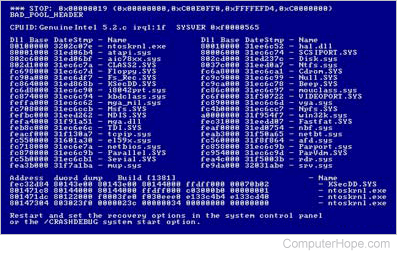
If you are getting a solid blue screen with no white text, you are not encountering a BSoD. It's likely a problem with your video card, monitor, or other hardware.
- Identify the blue screen by locating a line containing all capital letters with underscores instead of spaces, such as the above example, BAD_POOL_HEADER. Write this information down. If you do not see anything written in all caps with underscores like this, skip this step.
- Get either the STOP: error message at the top of the error, or in the "Technical Information:" portion of the error. For example, in the above error, it is STOP: 0x00000019, write the first portion of this error message down.
- Finally, if technical information is shown, write down the file and the address.
Once you have the above information, you can start troubleshooting the issue. Below are common blue screen errors and links to pages that contain the troubleshooting steps for some errors.
If your error is not listed in the below section, search for the error you wrote down.
- BAD_POOL_HEADER
- DRIVER_IRQL_NOT_LESS_OR_EQUAL
- DRIVER_POWER_STATE_FAILURE
- INACCESSIBLE_BOOT_DEVICE
- IRQL_NOT_LESS_OR_EQUAL
- KMODE_EXCEPTION_NOT_HANDLED
- NTFS_FILE_SYSTEM
- PAGE_FAULT_IN_NONPAGED_AREA
- STATUS_IMAGE_CHECKSUM_MISMATCH
- THREAD_STUCK_IN_DEVICE_DRIVER
- UNEXPECTED_KERNEL_MODE_TRAP
- UNKNOWN_HARD_ERROR
Fatal exceptions
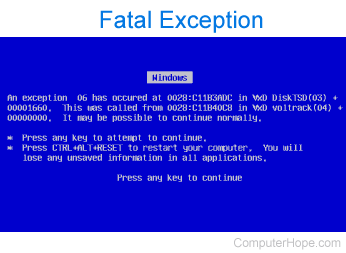
Many of the blue screen error messages you'll encounter with earlier versions of Windows will be fatal exception error messages or Fatal 0E messages. If your blue screen message starts out with A fatal exception 0E ... or An exception ..., you are encountering this error. For these blue screen errors, refer to the following article.