
Num Lock
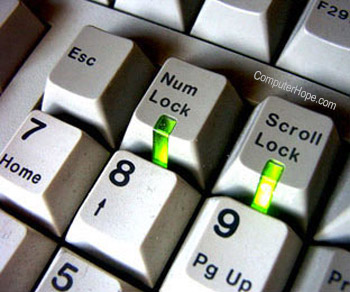
Short for numeric lock or number lock, the Num key, Num Lock, or Num Lk key is on the top-left corner of a keyboard's numeric keypad. The Num Lock key enables and disables the numeric pad.
When Num Lock is enabled, you can use the numbers on the keypad. When Num Lock is disabled, pressing those keys activates those keys' alternate functions. For instance, the arrow keys on the keypad may only be used if Num Lock is disabled. The picture shows what the Num Lock key with a LED (light) may look like on a keyboard.
Some people may refer to the numeric lock key as the number key. However, it should always be called a "Num Lock" or "Number Lock" key to prevent confusion. When discussing the number keys on the right side of many keyboards, they are called the numeric keypad.
Where is the Num Lock key?
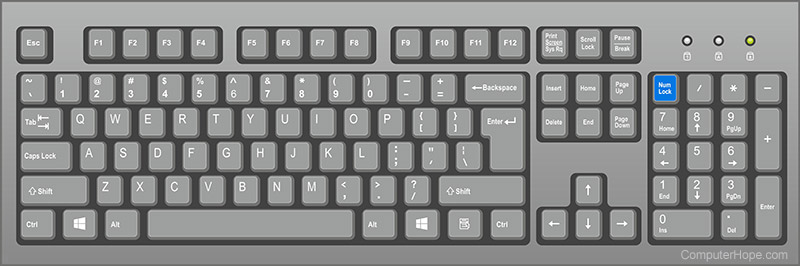
Below is an overview of a computer keyboard with the Num Lock key highlighted in blue on the numeric keypad.
Where is the Num Lock key on an Apple keyboard?
An Apple Mac computer keyboard with a number pad only functions as a number pad and has no alternative set of keys as the keyboard shown above. Therefore, Apple keyboards do not have a Num Lock key.
Where is a Num Lock key on a laptop keyboard?
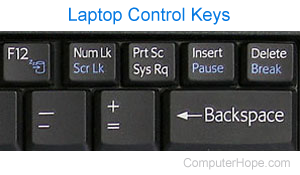
If you have a laptop with a numeric pad, the Num Lock key is in the same location as the keyboard shown above. However, most laptop keyboards do not have a numeric pad to help keep the laptop more compact. Laptops without a numeric keypad have a Num Lock key on another key around the Backspace key, as shown in the picture.
If a laptop uses two keys as one key, you must press the Fn key with the second key you want to use. In our example picture, the Scr Lk, Pause, and Break are all blue and a different color than the other keys. To use these keys, press the Fn key and the key with the blue text you want to use. With our example picture, if you needed Num Lock, you'd press the Num Lk key by itself and use Scroll Lock press and hold the Fn key and the Scr Lk key simultaneously.
With PC laptops, there's no standard placement for the Num Lock. Your laptop may not have the same configuration as shown in the picture. However, all PCs follow the same steps mentioned above.
How to turn Num Lock on and off
Using the Num Lock key
To turn on the Num Lock function, press the Num Lock key until you see the LED (light-emitting diode) indicator light turn on above it. Likewise, to turn it off, press the Num Lock key until the LED goes out. Once the Num Lock key is pressed, it stays on until it is pressed again.
The keyboard Num Lock light is blue, green, red, or white.
What if I can't find my Num Lock key or it is broken?
Some smaller keyboards, such as those on a laptop, don't have a Num Lock key. In other instances, the Num Lock key is broken, non-existent, or users can't find the key. Luckily there is a feature in Windows called the On-Screen Keyboard to help you out.
- Click Start or press the Windows key.
- Type OSK and press Enter.
- An image of a keyboard should appear. Click the Options key located in the lower-right corner of the window.
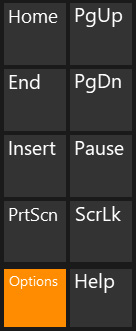
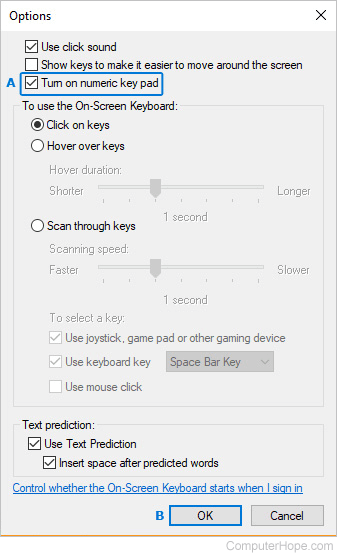
- In the Options window, ensure the box next to Turn on numeric key pad is checked (A) and click OK (B).
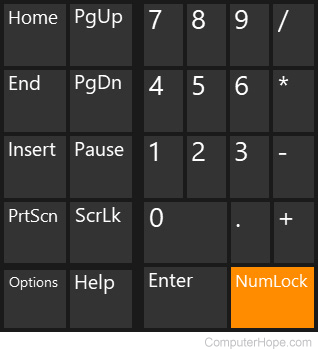
- You should now see the Num Lock key on the On-Screen Keyboard. You may use it to toggle the Num Lock function.
Why does Num Lock keep turning on?
By default, most computers turn on the Num Lock key each time the computer boots because you may need to use numeric keypad numbers. For example, if your login password has numbers and you used the numeric keypad to enter those numbers, it would fail without Num Lock being enabled.
Num lock keys
Below is a chart with additional information about what each numeric keypad key does when Num Lock is enabled and disabled. For example, pressing the "2" key on the numeric keypad when Num Lock is enabled enters the number "2," and when Num Lock is off, it arrows down one line.
The information below is only for keyboards with numeric keypads and doesn't apply to the number keys along the top of the keyboard.
| Key | Num lock enabled | Num lock disabled |
|---|---|---|
| 0 | 0 | Ins |
| 1 | 1 | End |
| 2 | 2 | Down arrow |
| 3 | 3 | PgDn |
| 4 | 4 | Left arrow |
| 5 | 5 | Nothing |
| 6 | 6 | Right arrow |
| 7 | 7 | Home |
| 8 | 8 | Up arrow |
| 9 | 9 | PgUp |
| . | . | Del |
Computer acronyms, Keyboard terms, Number, Numeric keypad, Togglekeys