
Copy
Copy may refer to any of the following:
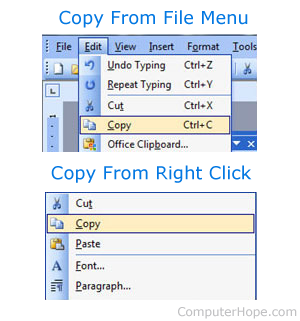
1. First developed by Larry Tesler, copy and paste, or copy, is duplicating text, data, files, or disks, producing two or more of the same file or segments of data. Copying a file to an alternate location, such as a USB (universal serial bus) jump drive, is a common procedure for backing up or sharing a file.
How to copy
How you're copying depends on what is being copied. Below are links to pages that explain how to copy text, files, directories, and other data on a computer. If you need help copying, visit the link that applies to what you're trying to copy.
What is the keyboard shortcut to copy?
Below is a listing of keyboard shortcuts for how to copy on different operating systems. Remember that whatever is being cut must be highlighted or selected first.
On many devices, right-click the highlighted text and select Copy from the right-click menu. Also, use the keyboard shortcut Ctrl+Insert to copy text.
When something is copied, where does it go?
When something is copied, it goes to the clipboard until something else is copied or cut on the computer. Storing what was copied in the clipboard allows it to be pasted multiple times until something new is copied to the clipboard.
How is copying different than moving?
When you copy something, you leave what you are copying in the same place and make a copy of it in another place. However, when you move something, you take it from one place to another. In other words, copying creates a duplicate, and moving does not.
Why would someone copy instead of move?
When you copy something, it remains in the same place and can be duplicated where it is pasted. For example, you could copy a file and then paste that file in five other folders to get six copies of a file.
What happens when nothing is selected and you copy?
If you press the Ctrl+C keyboard shortcut or attempt to copy through a menu and nothing is selected, nothing happens. Also, if something was in the clipboard, it would not replaced.
2. When dealing with more than one document, file, or other object that are the same, the original copy is the source.
3. Copy is also used in the command line to copy a file from one directory to another.
- See the copy command page for information about the MS-DOS and Windows command line command.
- See the Linux and Unix cp command overview for further information about this command.
Clipboard, Clone, Copy con, Ctrl+C, Ctrl+Ins, Cut, Duplicate, Move, Paste, Replicate, Software terms, Word processor terms, Xcopy