
Ctrl
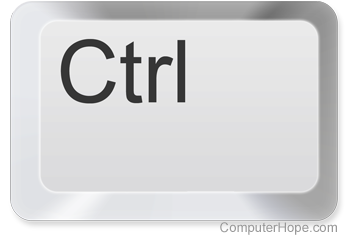
Short for control, Ctrl is a modifier key found on IBM-compatible computer keyboards in the bottom left and right portion of the main keyboard. The picture shows the Ctrl keyboard key.
See our control keys page for information about the keyboard keys, like the Home key, that help control and navigate a document and computer.
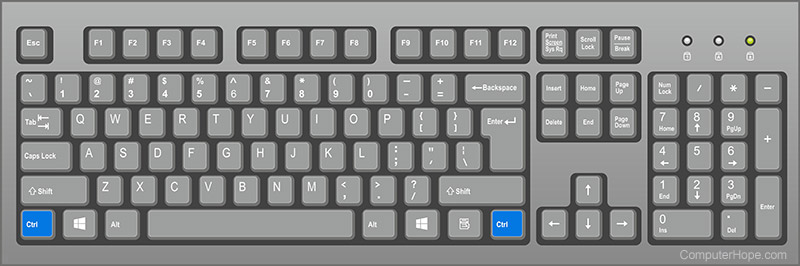
Where is the Ctrl key on the keyboard?
Below is an overview of an English QWERTY computer keyboard with Ctrl highlighted in blue.
Non-English keyboards, like QWERTZ keyboards, label this key as Strg.
How do you pronounce Ctrl?
Ctrl is pronounced as "control." When writing about the key on a PC keyboard, such as a keyboard shortcut, it's written "Ctrl" but pronounced "control." For example, you'd type Ctrl+F but say it as "control f" or "control plus F."
Apple control key
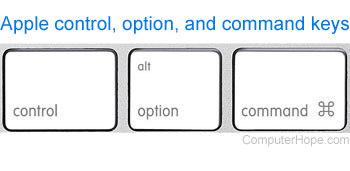
Apple computer keyboards also have a Control near Option and Command, as shown in the picture. The Control keys are found in the same location as Ctrl on an IBM computer. However, when comparing functionality to Ctrl on a Windows keyboard, the command key is more similar.
Ctrl keyboard shortcuts
Ctrl is used in keyboard shortcuts, such as the three-finger salute, also known as Ctrl+Alt+Del. This key combination suggests pressing and holding Ctrl, Alt, and Del to open the Task Manager or reboot the computer. Below are many of the two key keyboard shortcuts involving Ctrl.
You can click any Ctrl shortcut links below to open a page with a full list of uses for each shortcut.
| Ctrl | Pressing Ctrl by itself does nothing in most programs. In computer games, Ctrl is used to crouch or go into a prone position. |
| Ctrl+` | Change between displaying cell values or formulas in Microsoft Excel. |
| Ctrl+- | Zoom out and decrease the font size of a web page in an Internet browser. |
| Ctrl+= | Zoom in and increase the font size of a web page in an Internet browser. |
| Ctrl+[ | Decrease the font size of selected text in Microsoft Word and other text editors. |
| Ctrl+] | Increase the font size of selected text in Microsoft Word and other text editors. |
| Ctrl+\ | Select cells with a static value or don't match the value in the active cell in Microsoft Excel. |
| Ctrl+; | Insert the current date in a Microsoft Excel spreadsheet. |
| Ctrl+' | Copy a formula from the cell above in Microsoft Excel. |
| Ctrl+, | Decreases font size of highlighted text in Microsoft Word. |
| Ctrl+. | Increases font size of highlighted text in Microsoft Word. |
| Ctrl+/ | Locks and unlocks a layer in Adobe Photoshop. |
| Ctrl+0 | Pressing Ctrl and 0 (zero) at the same time restores the default zoom level. |
| Ctrl+1 | Switches to the first tab in a browser or another program with tab support. |
| Ctrl+2 | Switches to the second tab in a browser or another program with tab support. |
| Ctrl+3 | Switches to the third tab in a browser or another program with tab support. |
| Ctrl+4 | Switches to the fourth tab in a browser or another program with tab support. |
| Ctrl+5 | Switches to the fifth tab in a browser or another program with tab support. |
| Ctrl+6 | Switches to the sixth tab in a browser or another program with tab support. |
| Ctrl+7 | Switches to the seventh tab in a browser or another program with tab support. |
| Ctrl+8 | Switches to the eighth tab in a browser or another program with tab support. |
| Ctrl+9 | Switches to the last tab in a browser. |
| Ctrl+A | These two keys select all text or other objects. |
| Ctrl+B | Bold highlighted text. |
| Ctrl+C | Copy any selected text or another object. |
| Ctrl+D | Bookmark an open web page or open font window in Microsoft Word. |
| Ctrl+Del | Deletes the word to the right of the cursor in many programs, including Microsoft Office applications, like OneNote, PowerPoint, Word, and the Notepad text editor. |
| Ctrl+E | Center text. |
| Ctrl+End | Moves cursor to the end of a document or page. |
| Ctrl+Enter | Autocompletes a URL (uniform resource locator) in an address bar. |
| Ctrl+Esc | Open the Windows Start menu. |
| Ctrl+F | Open find window. |
| Ctrl+F1 | Show and hide the Microsoft Office Ribbon or task pane. |
| Ctrl+F2 | Open the print preview in Microsoft Office programs, like Microsoft Word and Excel. |
| Ctrl+F3 | Copy selected items into Spike in Microsoft Word. |
| Ctrl+F4 | Closes the currently active tab or window in a program. |
| Ctrl+F5 | Performs a hard refresh in a browser window. |
| Ctrl+F6 | Go to the next available workbook in Microsoft Excel. |
| Ctrl+F7 | Help move a window in Microsoft Excel. |
| Ctrl+F8 | Resize an Excel workbook window. |
| Ctrl+F9 | Create a new field code formatting marks in Microsoft Word. |
| Ctrl+F10 | Toggle between minimized and maximized window in new versions of Microsoft Excel. |
| Ctrl+F11 | Insert a macro sheet in Microsoft Excel. |
| Ctrl+F12 | Open a document in Office programs. |
| Ctrl+G | Go to the next match of a find in a browser and word processor. |
| Ctrl+H | Open the Find and Replace in Notepad, Microsoft Word, and WordPad. |
| Ctrl+Home | Moves cursor to the start of a document or page. |
| Ctrl+Ins | Copy any selected text or another object. |
| Ctrl+I | Italicize text. |
| Ctrl+J | View downloads in browsers and sets justify alignment in Microsoft Word. |
| Ctrl+K | Create a hyperlink for the highlighted text in Microsoft Word and many HTML editors. |
| Ctrl+L | Selects the address bar in a browser or left aligns text in a word processor. |
| Ctrl+M | Indent selected text in word processors and other programs. |
| Ctrl+N | Create a new page or document. |
| Ctrl+O | Open a file in most programs. |
| Ctrl+P | Open a print window to print the page you're viewing. |
| Ctrl+Q | Remove the paragraph formatting in Microsoft Word. |
| Ctrl+R | Reload the page in a browser or right-align text in a word processor. |
| Ctrl+S | Save the document or file. |
| Ctrl+Space | Select an entire column in an Excel spreadsheet. |
| Ctrl+T | Create a new tab in an Internet browser or adjust tabs in word processors. |
| Ctrl+Tab | Switch between open tabs in browsers or other tabbed programs (left to right). Ctrl+Shift+Tab is opposite (right to left). |
| Ctrl+U | Underline selected text. |
| Ctrl+V | Paste any text or another object that was copied. |
| Ctrl+W | Close open tab in a browser or close a document in Word. |
| Ctrl+X | Cut selected text or another object. |
| Ctrl+Y | These keys redo any undo action. |
| Ctrl+Z | Undo any recent action. |
| Ctrl+↓ | In a spreadsheet, like Microsoft Excel, move to the bottom or last entry in the data set. In macOS, show all windows of the foreground app. |
| Ctrl+↑ | In a spreadsheet, like Microsoft Excel, move to the top or first entry in the data set. In macOS, open Mission Control. |
| Ctrl+← | Move one word to the left, instead of one character. In macOS, view the previous desktop. |
| Ctrl+→ | Move one word to the right, instead of one character. In macOS, view the next desktop. |
| Ctrl+click | Hold down Ctrl and clicking with the mouse has different functions. |
See our keyboard shortcut list for a full listing of all shortcuts.
Where is the Ctrl key on smartphones and tablets?
All Android devices, Apple smartphones (iPhone), tablets (iPads), and other mobile devices with touch screens don't have a Ctrl key. The Ctrl key is a modifier key that modifies the functions of other keys (e.g., keyboard shortcuts), which are not used with these devices.
With a computer on-screen keyboard, the Alt key is on both sides of the spacebar.
How to write or abbreviate Ctrl or control
When writing for a PC or IBM-compatible computer, the control key should always be written as "Ctrl" with a capital "C" and lowercase "trl." Early Microsoft documentation and computer keyboards used "CTRL" but have since moved to using "Ctrl." When writing for an Apple computer user, "control" or "Control" should be used to prevent any confusion with them not having a Ctrl.
Many notations represent Ctrl. Some documentation may also list commands, such as ^X, ^C, ^Z, etc., which means Ctrl+X, Ctrl+C, Ctrl+Z, etc. In other words, a user would want to press and hold Ctrl or control and press the letter following the caret.
Below are example notations that represent pressing and holding down Ctrl and C simultaneously. These notations are shorthand in documentation and may be shown on computer screens when Ctrl is pressed.
| Notation | Description |
|---|---|
| ^C | Traditional notation that uses a caret (^) to represent Ctrl with the letter that is pressed in conjunction. |
| Ctrl+C | Microsoft notation and notation used throughout Computer Hope. |
| CTRL-C | Early notation used by Microsoft. |
| ⌃C or Control-C | Traditional macOS notation uses the "up arrowhead" character (U+2303, ⌃), followed by the letter indicating a control combination. |
| C-c | Emacs and Vim notation. |
| Ctrl/C | OpenVMS notation. |
Alt, Caret, Computer abbreviations, Control, Control keys, Keyboard terms, Modifier key, Option key, Strg